SlurmUI: a web control centre for your SLURM cluster
Cluster configuration, node bootstrapping, a browser terminal, job insights and proxy exposure, without the terminal windows and SSH configs.
Managing your High-Performance Computing cluster just got a whole lot easier.
We know that managing a SLURM cluster usually means juggling endless terminal windows, complex SSH configs, and tedious node bootstrapping. Not anymore.
Meet SlurmUI: the streamlined control center designed to bring web-based simplicity to your high-performance computing (HPC) infrastructure.
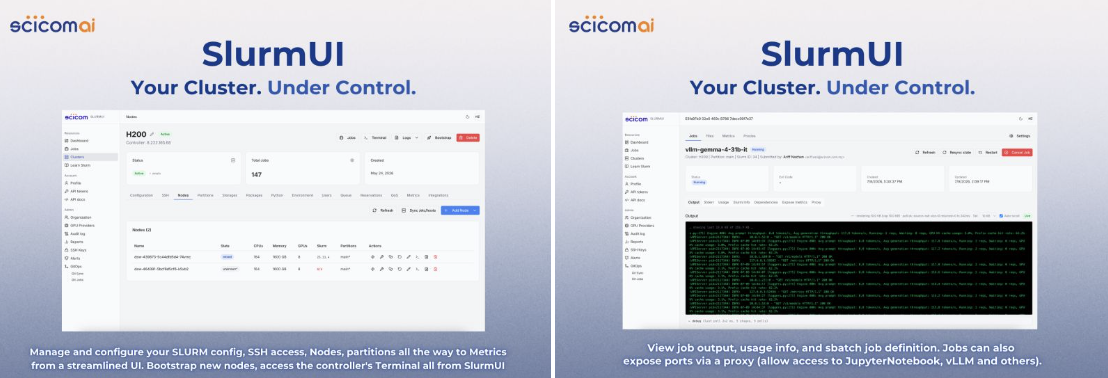
Here is what you can do directly from the UI:
- Complete cluster management. Configure your SLURM config, SSH access, nodes, and partitions, and monitor real-time metrics in one centralized dashboard.
- Instant node bootstrapping. Spin up and bootstrap new nodes with just a few clicks.
- Built-in controller terminal. Access the controller's terminal directly from your browser, no external SSH client required.
- Deep job insights. Effortlessly view job outputs, track resource usage info, and review sbatch job definitions.
- Built-in proxy exposure. Instantly expose ports via a secure proxy, allowing seamless, direct access to active workloads like JupyterNotebooks, vLLM instances, and more.
Stop fighting the CLI configuration gridlock and start optimizing your workflow.
We have since added DynamoUI inside SlurmUI. Prefill and decode disaggregation matters if you want to optimise your LLM inference SLO, so you can promise a better SLA, and NVIDIA Dynamo allows heterogeneous deployment where parallelism size and GPU type can differ between the two phases.
Ready to streamline your cluster? Talk to the Scicom AIES team about what it would take in your infrastructure.
First published on LinkedIn, 2 August 2026, with the DynamoUI note from a follow-up post the same month.